
Your kid is stuck on Scratch.
Help is one click away.
Pengi sits inside the Scratch editor and talks your child through every bug — with voice, in real time.
Loved by 1,000+ students
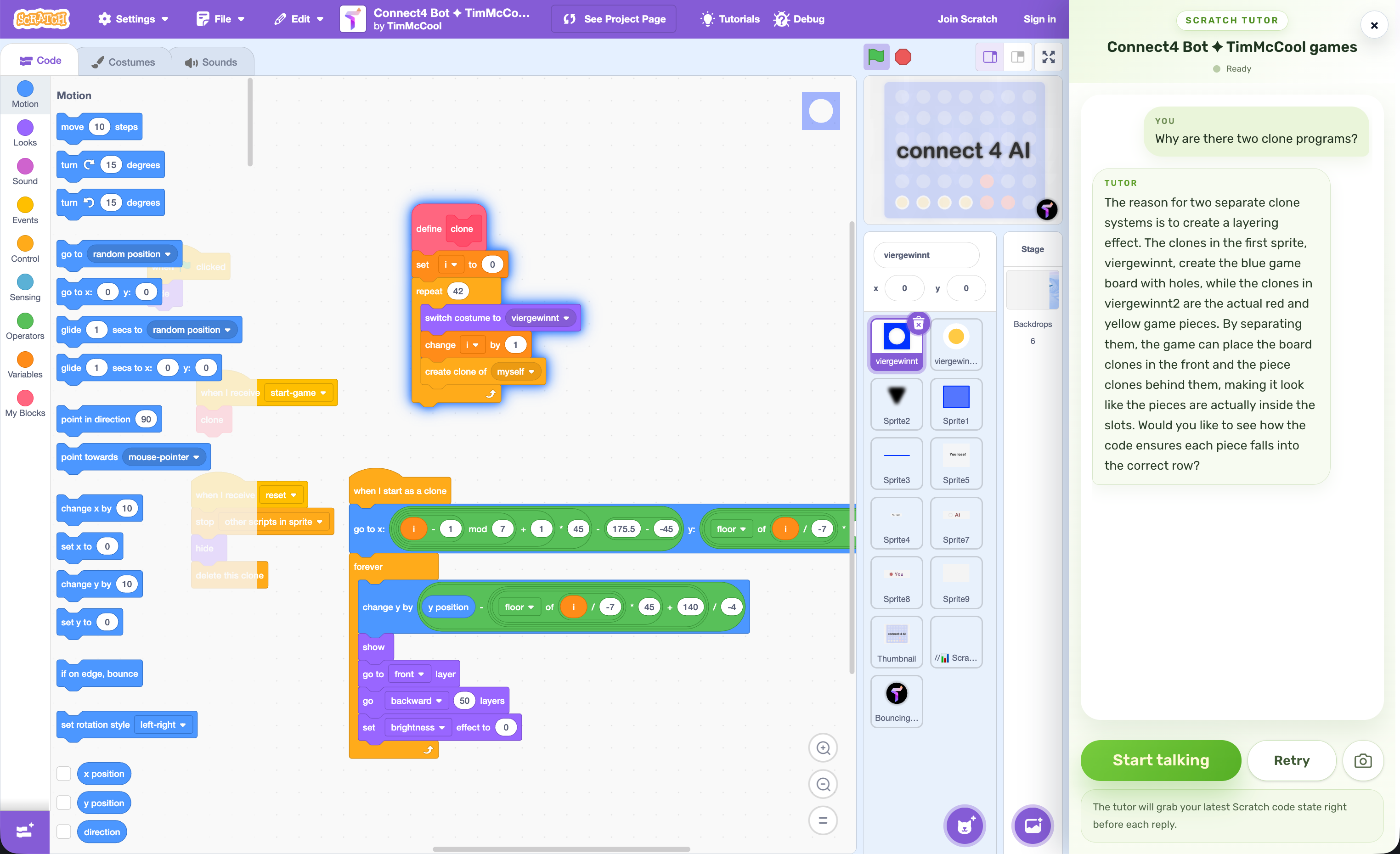
Sees the blocks. Hears the question. Gives help, NOT answers.
Sound familiar?
These are the moments kids close the laptop and give up. Pengi turns them into breakthroughs.
"My sprite won't move!"
Forgot to put the move block inside a loop.
 Pengi:
"I see your move block is outside the loop. What happens if we drag it inside the forever block?"
"My game keeps crashing!"
Infinite clone spawning, no stop condition.
Pengi:"Your clone count is growing fast. What condition should stop creating new clones?"
"The score isn't working!"
Variable scope: "for this sprite only" vs "for all sprites".
Pengi:"Your score variable is set to \"for this sprite only\". What happens when another sprite tries to read it?"
"I don't know how to make this..."
Wants to build a platformer but has no idea where to start.
Pengi:"Let's start simple. What should happen to your character when they're not standing on a platform?"
3x
more projects completed
vs learning alone
5 min
average time to unstuck
down from 40+ min
87%
of kids keep coding
instead of giving up
Without Pengi vs. with Pengi
Result: kid stops coding within weeks
Result: kid builds projects independently
From install to “aha!”
in 30 seconds
Install & sign in
30 seconds.Add the Pengi extension from the Chrome Web Store and sign in with Google or email. Done.
Works on Chrome, Edge, Brave. Parents can create managed student accounts.
Open Scratch
Pengi appears automatically.Open any project on scratch.mit.edu. A small Pengi button appears in the editor — click it when you need help.
Pengi reads your blocks, sprites, and project state in real time. No copy-pasting needed.
Ask anything, anytime
Voice or text. 24/7."Why isn't my sprite moving?" "How do I add gravity?" "What's wrong with my loop?" — just ask out loud or type.
Pengi responds with guiding questions, never with answers. Your child learns by discovering, not copying.
“But my kid already
takes a Scratch class”
Great. Pengi covers the 95% of practice time when the teacher isn't there.
Between classes
Your child learns concepts in their coding course. When they practice at home and get stuck, Pengi bridges the gap until the next class.
Beyond the curriculum
Courses follow a fixed path. When your child wants to build something off-script — a game, an animation, a story — Pengi guides them through uncharted territory.
Building debugging muscle
Real programmers spend most of their time debugging. Pengi teaches this skill from day one by asking "what do you think went wrong?" instead of just fixing it.
Think of Pengi as a patient teaching assistant that's always on duty —
at 10pm, on weekends, during school breaks, and whenever curiosity strikes.
Common questions
- Will the AI write my child's code?
- Never. Pengi uses the Socratic method — it asks guiding questions like "Which block controls movement?" or "What happens if you put this inside a loop?" Your child does the thinking. Pengi just makes sure they don't stay stuck.
- Is it really free?
- The Chrome Extension is free to install and includes a free trial. After the trial, a subscription is required for continued tutoring. Plans start at a few dollars per month — less than a single hour with a human tutor.
- Is it safe for kids?
- Pengi is designed for K-12 students. It only responds to questions about the current Scratch project. There's no social features, no chat with strangers, and no off-topic content. Parents can create managed student accounts with full visibility into their child's learning.
- My child already takes a Scratch class. Do they need this?
- Pengi doesn't replace classes — it fills the gaps between them. When your child practices at home at 9pm and hits a wall, they don't have to wait until the next lesson. Pengi is there immediately, using the same teaching approach a good tutor would.
- What age is this for?
- Pengi works for any Scratch user, but it's especially effective for kids ages 8-14 who are learning independently or between classes. The voice interaction makes it accessible even for younger kids who find typing slow.
- Does it work on other platforms?
- Yes. The same extension also works on Khan Academy, IXL, and PhET Simulations — providing the same Socratic tutoring on each platform.
Next time they're stuck,
they won't need you.
Install Pengi now. The next time your child hits a wall on Scratch, they'll click one button and figure it out themselves.
Free trial included. Works on Scratch, Khan Academy, IXL, and PhET.